Views: 112
Building CodeIgniter Contact Form
The Controller File
Create a file named “contactform.php” inside application >> controllers folder. Codeigniter provides email library which makes the mail sending task very easier for us.
First let’s load the required libraries and helpers in the controller.
<?php
class contactform extends CI_Controller
{
    public function __construct()
    {
        parent::__construct();
        $this->load->helper(array('form','url'));
        $this->load->library(array('session', 'form_validation', 'email'));
    }
}
?>
Next create a custom validation function to allow only alphabets and space for the name field.
<?php
class contactform extends CI_Controller
{
    ...

    //custom validation function to accept only alphabets and space input
    function alpha_space_only($str)
    {
        if (!preg_match("/^[a-zA-Z ]+$/",$str))
        {
            $this->form_validation->set_message('alpha_space_only', 'The %s field must contain only alphabets and space');
            return FALSE;
        }
        else
        {
            return TRUE;
        }
    }
}
?>
Then create the index() function to be called on page load. Here we’ll define the form validation rules and run the validation check on form input data.
<?php
class contactform extends CI_Controller
{
    ...

    function index()
    {
        //set validation rules
        $this->form_validation->set_rules('name', 'Name', 'trim|required|xss_clean|callback_alpha_space_only');
        $this->form_validation->set_rules('email', 'Emaid ID', 'trim|required|valid_email');
        $this->form_validation->set_rules('subject', 'Subject', 'trim|required|xss_clean');
        $this->form_validation->set_rules('message', 'Message', 'trim|required|xss_clean');

        //run validation on form input
        if ($this->form_validation->run() == FALSE)
        {
            //validation fails
            $this->load->view('contact_form_view');
        }
        else
        {
            // code to send mail
        }
    }
}
?>
If there is any validation error we re-populate the input data and display the error message below the input fields.
If the validation is successful then we’ll move on to send mail.
Add Email Sending Functionality to Contact Form
To send email, first we have to set the email preferences and initialize the ’email’ library.
<?php
    //configure email settings
    $config['protocol'] = 'smtp';
    $config['smtp_host'] = 'ssl://smtp.gmail.com';
    $config['smtp_port'] = '465';
    $config['smtp_user'] = 'user@gmail.com'; // email id
    $config['smtp_pass'] = 'password'; // email password
    $config['mailtype'] = 'html';
    $config['wordwrap'] = TRUE;
    $config['charset'] = 'iso-8859-1';
    $config['newline'] = "\r\n"; //use double quotes here
    $this->email->initialize($config);
?>
The above is the codeigniter email settings for gmail smtp server. Likely you can use any other third party smtp servers other than gmail. Learn more about sending email in codeigniter using smtp protocol.
Next use the form data to send email.
<?php
    //get the form data
    $name = $this->input->post('name');
    $from_email = $this->input->post('email');
    $subject = $this->input->post('subject');
    $message = $this->input->post('message');

    //set to_email id to which you want to receive mails
    $to_email = 'user@gmail.com';

    //send mail
    $this->email->from($from_email, $name);
    $this->email->to($to_email);
    $this->email->subject($subject);
    $this->email->message($message);
    if ($this->email->send())
    {
        // mail sent
        $this->session->set_flashdata('msg','<div class="alert alert-success text-center">Your mail has been sent successfully!</div>');
        redirect('contactform/index');
    }
    else
    {
        //error
        $this->session->set_flashdata('msg','<div class="alert alert-danger text-center">There is error in sending mail! Please try again later</div>');
        redirect('contactform/index');
    }
?>
The variable $to_mail is the email-address you want to receive the mails.
The method $this->email->send() will return a boolean value TRUE/FALSE depending on if mail is sent or not. Using it inside if statement, we set success or failure message to notify the user. Here we use $this->session->set_flashdata() to store the message and display it when the page is redirected.
Complete Code for the Contact Form Controller:
<?php
class contactform extends CI_Controller
{
    public function __construct()
    {
        parent::__construct();
        $this->load->helper(array('form','url'));
        $this->load->library(array('session', 'form_validation', 'email'));
    }

    function index()
    {
        //set validation rules
        $this->form_validation->set_rules('name', 'Name', 'trim|required|xss_clean|callback_alpha_space_only');
        $this->form_validation->set_rules('email', 'Emaid ID', 'trim|required|valid_email');
        $this->form_validation->set_rules('subject', 'Subject', 'trim|required|xss_clean');
        $this->form_validation->set_rules('message', 'Message', 'trim|required|xss_clean');

        //run validation on form input
        if ($this->form_validation->run() == FALSE)
        {
            //validation fails
            $this->load->view('contact_form_view');
        }
        else
        {
            //get the form data
            $name = $this->input->post('name');
            $from_email = $this->input->post('email');
            $subject = $this->input->post('subject');
            $message = $this->input->post('message');

            //set to_email id to which you want to receive mails
            $to_email = 'user@gmail.com';

            //configure email settings
            $config['protocol'] = 'smtp';
            $config['smtp_host'] = 'ssl://smtp.gmail.com';
            $config['smtp_port'] = '465';
            $config['smtp_user'] = 'user@gmail.com';
            $config['smtp_pass'] = 'password';
            $config['mailtype'] = 'html';
            $config['charset'] = 'iso-8859-1';
            $config['wordwrap'] = TRUE;
            $config['newline'] = "\r\n"; //use double quotes
            //$this->load->library('email', $config);
            $this->email->initialize($config);

            //send mail
            $this->email->from($from_email, $name);
            $this->email->to($to_email);
            $this->email->subject($subject);
            $this->email->message($message);
            if ($this->email->send())
            {
                // mail sent
                $this->session->set_flashdata('msg','<div class="alert alert-success text-center">Your mail has been sent successfully!</div>');
                redirect('contactform/index');
            }
            else
            {
                //error
                $this->session->set_flashdata('msg','<div class="alert alert-danger text-center">There is error in sending mail! Please try again later</div>');
                redirect('contactform/index');
            }
        }
    }

    //custom validation function to accept only alphabets and space input
    function alpha_space_only($str)
    {
        if (!preg_match("/^[a-zA-Z ]+$/",$str))
        {
            $this->form_validation->set_message('alpha_space_only', 'The %s field must contain only alphabets and space');
            return FALSE;
        }
        else
        {
            return TRUE;
        }
    }
}
?>
The View File
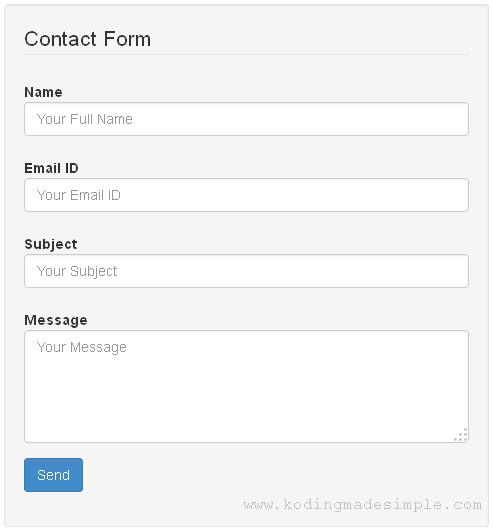
Next we have to create view file for codeigniter contact form. Create a file named “contact_form_view.php” inside application >> views folder. This file will holds up the html markup mixed with bootstrap css classes to render the form. Using the bootstrap form classes will properly align the form elements with required padding. Here is the complete markup for our contact form.
<!DOCTYPE html>
<html>
<head>
    <meta name="viewport" content="width=device-width, initial-scale=1.0">
    <title>CodeIgniter Contact Form Example</title>
    <!--load bootstrap css-->
    <link href="<?php echo base_url("path/to/bootstrap/bootstrap.css"); ?>" rel="stylesheet" type="text/css" />
</head>
<body>
<div class="container">
    <div class="row">
        <div class="col-md-6 col-md-offset-3 well">
            <?php $attributes = array("class" => "form-horizontal", "name" => "contactform");
            echo form_open("contactform/index", $attributes);?>
            <fieldset>
            <legend>Contact Form</legend>
            <div class="form-group">
                <div class="col-md-12">
                    <label for="name" class="control-label">Name</label>
                </div>
                <div class="col-md-12">
                    <input class="form-control" name="name" placeholder="Your Full Name" type="text" value="<?php echo set_value('name'); ?>" />
                    <span class="text-danger"><?php echo form_error('name'); ?></span>
                </div>
            </div>

            <div class="form-group">
                <div class="col-md-12">
                    <label for="email" class="control-label">Email ID</label>
                </div>
                <div class="col-md-12">
                    <input class="form-control" name="email" placeholder="Your Email ID" type="text" value="<?php echo set_value('email'); ?>" />
                    <span class="text-danger"><?php echo form_error('email'); ?></span>
                </div>
            </div>

            <div class="form-group">
                <div class="col-md-12">
                    <label for="subject" class="control-label">Subject</label>
                </div>
                <div class="col-md-12">
                    <input class="form-control" name="subject" placeholder="Your Subject" type="text" value="<?php echo set_value('subject'); ?>" />
                    <span class="text-danger"><?php echo form_error('subject'); ?></span>
                </div>
            </div>

            <div class="form-group">
                <div class="col-md-12">
                    <label for="message" class="control-label">Message</label>
                </div>
                <div class="col-md-12">
                    <textarea class="form-control" name="message" rows="4" placeholder="Your Message"><?php echo set_value('message'); ?></textarea>
                    <span class="text-danger"><?php echo form_error('message'); ?></span>
                </div>
            </div>

            <div class="form-group">
                <div class="col-md-12">
                    <input name="submit" type="submit" class="btn btn-primary" value="Send" />
                </div>
            </div>
            </fieldset>
            <?php echo form_close(); ?>
            <?php echo $this->session->flashdata('msg'); ?>
        </div>
    </div>
</div>
</body>
</html>
We have used codeigniter’s form_error() method below each input field to display the validation errors. Simultaneously we use set_value() method to repopulate the form input in case of validation errors. We display these errors in red color by using bootstrap’s “text-danger” class element.

Towards the bottom of the form, we echoed flashdata() message to display the success or failure message to the user. The success message will be displayed inside a green color box and failure message in a red color box.

I hope now you have a good understanding of building contact form in codeigniter.
